How Tangem Works: Cards, Secure Backups and Factory Resets
I bought a set of 3 Tangem cards and used the seedless setup. There was no recovery phrase to write down.
Many hardware wallets ask you to keep 12 or 24 recovery words somewhere safe, so you can restore your wallet if the device dies. With seedless Tangem, the spare cards are your backup. If all 3 become permanently unusable, there’s no written phrase to fall back on.
What you’re using when you tap a card
Your crypto stays on the blockchain. Each Tangem card holds the private keys that authorize spending from your wallet. For the examples below, I’ll call that secret material the “wallet key.”
The phone runs the app, shows balances and prepares transactions. When you send crypto, a card signs the transaction inside its chip after the required authorization. The app can then broadcast that signed transaction without getting the wallet key.
You can receive crypto at an existing address without tapping a card. Receiving funds doesn’t require your signature.
Does Tangem already know my wallet at the factory?
According to Tangem, the wallet key is created inside the card’s secure chip when you activate it. Its hardware random number generator supplies the randomness. In this seedless setup, the phone doesn’t generate the wallet key, and there’s no hidden 12- or 24-word phrase waiting to be revealed.
But the card does leave the factory with a different secret: a device identity key. It also has a certificate signed by Tangem, which lets other cards verify its identity.
Think of that certificate as the card’s manufacturer-issued ID. It exists before your wallet does. Tangem certifying the card’s public identity key doesn’t mean it knows the wallet key you’ll create later.
This distinction matters after the Ledger incidents I wrote about. A genuine Ledger can still be tampered with: authenticating a chip answers a specific question about that chip. It doesn’t establish that every part of a product or its supply chain is safe.
Why 3 cards can open the same wallet
During setup, one card creates the wallet key and backs it up to the other 2 cards. Call them A, B and C.
After backup, each card holds a complete copy of the same key. You don’t need to bring 2 cards together to send money, and each card isn’t holding one-third of a secret. Any one unlocked card can sign for the wallet. Tangem’s backup guide confirms that all cards have equal access.
That makes the spare cards useful if you lose one. It also means keeping all 3 in the same bag gives you a single bag to lose.
How the cards exchange a key securely through your phone
The phone carries the backup between cards, but can’t read the wallet key. Here’s the process described in Tangem’s backup design:
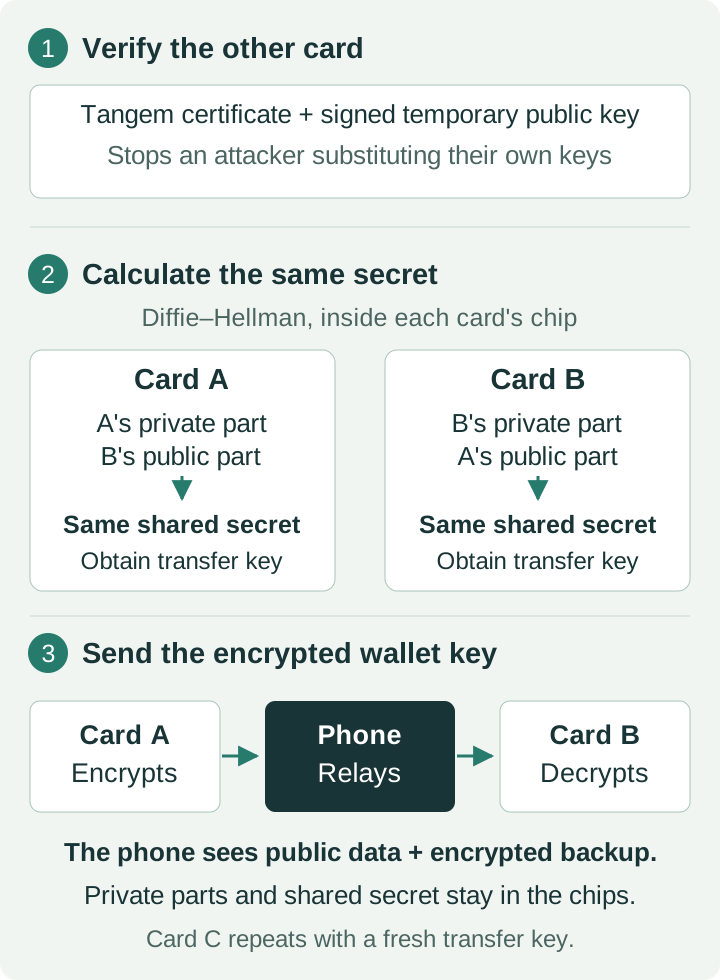
Diffie–Hellman lets both cards calculate the same shared secret using different private/public inputs. The phone sees the public parts, but lacks either private part; calculating the secret from public information alone is computationally infeasible. Checking the certificates and signatures stops it substituting its own exchange keys.
Card C gets the same wallet key through a fresh exchange with a different transfer-encryption key. Encrypted copies travel through the phone; the readable wallet key stays inside the chips, according to Tangem.
The Ledger implant attack stole recovery words from a screen. Tangem’s seedless setup doesn’t display those words. That avoids this particular exposure, but still relies on the chips and firmware working as described. It won’t protect you from approving a scam transaction.
Your access code belongs to each card
The access code is the password that protects use of a card. It isn’t the wallet key and can’t restore your wallet by itself. You still need a physical card for signing.
Changing the code updates the selected card’s authentication setting. The wallet key, receiving addresses and funds stay the same. It’s separate from a factory reset.
To replace the old access code across your set, change it on all 3 cards individually. Updating A leaves B and C untouched, as Tangem explains in its access-code instructions.
For example:
| Card | After changing only A’s code | Wallet key |
|---|---|---|
| A | New code | X |
| B | Old code | X |
| C | Old code | X |
All 3 still access the same wallet. You can keep different codes, but if your intention is to retire the old one, you’re only finished after updating every card.
In the app, select the wallet, open Device settings, authenticate and scan the card. Choose Change Access Code, enter and confirm the new code, then tap that card to save it. Repeat for B and C.
The cards don’t have a background connection that synchronizes these changes. A spare sitting in a drawer won’t learn your new code until you physically update it.
If you forget the code
Tangem has a separate code-recovery flow using the card you’re trying to unlock plus another linked backup card. Availability depends on the cards’ recovery settings; recovery can be disabled on supported models.
Recovering an access code doesn’t create a new wallet. But losing your code when recovery is unavailable can leave you unable to use that card, even though its wallet key is still there.
What a factory reset actually does
A factory reset erases the selected card’s wallet keys. It doesn’t send a transaction or move the crypto anywhere.
Suppose A, B and C all hold wallet key X:
| Action | Card A | Cards B and C |
|---|---|---|
| Reset A | No wallet key | Still hold X |
| Create a new wallet on A | Holds new key Y | Still hold X |
A now opens a different wallet with new addresses. B and C still open the original wallet, provided you can unlock them. Resetting A doesn’t remotely erase the cards you haven’t tapped.
My initial setup hit a problem, and I think the app mentioned a factory reset. I haven’t established exactly which cards were reset or what completed, so I wouldn’t use that episode as a diagnosis of Tangem’s setup process.
The general rule is clear, though: check what each card can still access before erasing anything else.
A reset card can’t simply rejoin the old backup
Tangem allows the backup process to be completed once for a wallet. After it is finalized, the remaining cards can’t export that wallet key again to refill a reset card or add another spare.
So resetting A doesn’t give you a way to copy X back from B later. Creating a fresh wallet on reset cards creates new keys; moving your existing crypto into it requires a blockchain transfer from the old wallet.
If at least one original card remains usable, you still have access. If you erase every copy in this seedless setup, there isn’t a recovery phrase to fall back on, and Tangem can’t recreate the old key for you.
Before resetting the whole set, move your funds to another wallet and confirm they’ve arrived. Don’t erase your last usable copy first.
What happens after 25 years?
Tangem advertises a 25-year limited hardware warranty and says the cards should last at least that long with proper care. That isn’t a scheduled expiry: a card may keep working beyond 25 years. It also isn’t a promise that the hardware will last forever.
For this seedless setup, the risk is losing every usable copy of the key. One failed card leaves the others available. If all 3 become permanently unusable, you lose access to the funds. The crypto remains on-chain, but you can’t spend it, and Tangem can’t recreate your key. Its recovery guidance makes that dependence on the cards clear.
That’s the tradeoff I’m accepting: no recovery phrase to store or accidentally expose, but recovery depends on physical cards that can fail. A replacement card alone won’t recover the old wallet.
I’d plan to migrate before relying on the set past the 25-year mark, and sooner if cards start failing. Migration means creating a new wallet and transferring the funds to its new addresses, with network fees. You can’t clone the old key onto a fresh set after backup is finalized.
Move the funds while you still have a working, unlockable card.